Check for AI-generated content and plagiarism
without leaving your AI agent
Ask in plain language. See what was flagged, and why, directly in your agent’s chat. Add it yourself in a few clicks.
 Claude
 Antigravity
 Cursor
 VS Code
 ChatGPT Codex


Trusted by universities, publishers, and enterprises worldwide






Fast, consistent integrity checks,
with no developers needed
Copyleaks' AI detection technology is recognized by researchers worldwide for its accuracy and is already trusted by leading enterprises and universities.
91%
of organizations don't feel "very prepared" to implement generative AI responsibly.
Source: McKinsey
49%
of employees have used AI tools without employer approval.
Source: CIO

A safe way to say yes to AI
Give teams an approved AI workflow they can trust

Defensible data
Every result links to a full report with the flagged passages and sources, so it’s easy to understand and share.

Live in minutes
No API key and no development. Approve the connector and start, with Copyleaks support behind it.

Check in batches, or on a schedule
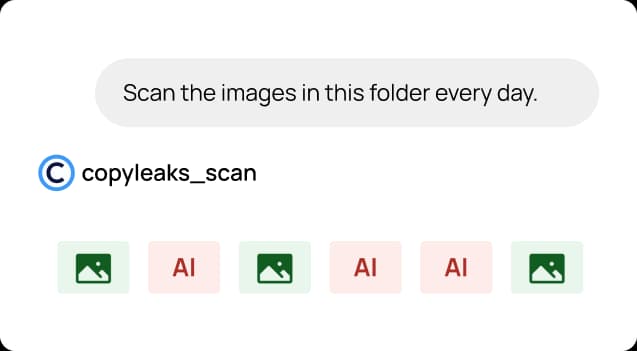
Let agents that support scheduled tasks run daily checks on your folder as part of your routine.
Easy content integrity insights, without an integration project
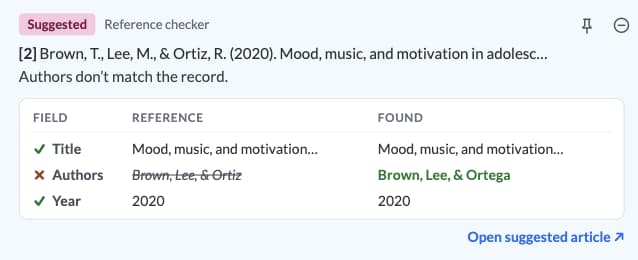
Copyleaks hands your agent the results: scores, flagged passages, and matched sources. Your agent returns answers, creates presentations, and connects to next steps.

Ask follow-up questions
"Why was this paragraph flagged?" "Which source overlaps the most?" Your agent reads the flagged segments and explains each one.

Spot trends in your scan history
Search past scans, rank them against your threshold, and chart how AI content or matches changed month to month.

Compare and prioritize:
Rank a batch of files by AI content, list everything over 40% AI, or compare a rescan with last month's result.
Works with the tools your
team already uses
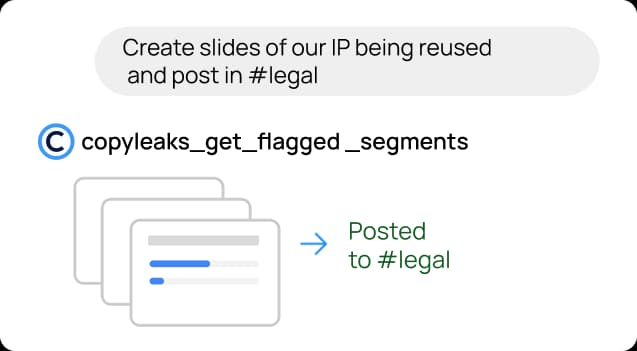
Combine with other MCPs and LLM abilities for end-to-end workflows. Pull files from Drive, scan them with Copyleaks, and send the results to Slides, Slack, or Jira in one prompt.
Built for the whole org chart
Every team that publishes or receives content can scan it before a final call is made. Find your industry and try these prompts with your own files.
Publishing and media
For editors, photo desks, and fact-checkers
Review faster, meet deadlines, and maintain the value of original content. Verify articles and images in bulk before they run, and spot unauthorized reuse of your reporting.
Try a prompt
Copy a prompt into Claude with Copyleaks installed. Not set up yet? Add the Copyleaks connector
4 new images checked in /Photo desk/Today. 1 flagged as AI-generated.
- harbor-fire_0412.jpgHuman
- flood-aerial_02.jpgAI
- council-vote_11.jpgHuman
- marathon-finish_09.jpgHuman
What you get: Photo desks get an AI or Human verdict for every image in the folder, before anything is published.
Enterprise-grade security
Your account stays safe, with thoughtful guardrails.
What your agent can do:
- Scan text, files, web pages, and images
- Read results, flagged segments, and scan history
- Check scan status and credit balance
- Read and manage your saved scan profiles
What it can never do:
- Buy credits or change your plan
- Delete anything
- Create share links or download reports
- Open scans others shared with you


Check content wherever your team already works
Use the app, your AI agent, the API, or your learning platform. Every option gives the same results, so pick the one that fits your team.
Your content (documents, web pages, code, images)
One account behind all of them.
Every scan lands in your scan history with a report link, so you can pick up in the app wherever your agent left off.
- Copyleaks app: See every match and AI insight in context, with your full scan history. Setup: none. Sign in and scan.
- AI agent (MCP): Answers, trends, and reports stay in the agent you already use. Setup: minutes, with no developers and no API key.
- API: Results flow into your own products and workflows, plus AI video and speech detection, grammar, citation, and image plagiarism checks. Setup: developer integration.
- LMS: Reports appear in the learning management system where instructors and students already work. Setup: install the integration for your platform.
- Extensions/Plugins: Google Docs, WordPress Plugin, browser extension. Setup: one minute, with one click installation
See it check
your own content
Frequently Asked Questions
Yes. You need an active paid Copyleaks account, and each scan uses the same number of credits as it does in the app. You do not need an API key, because the API is a separate product. See plans and pricing: https://copyleaks.com/pricing
Any agent that supports the Model Context Protocol (MCP) open standard. Copyleaks has written setup steps for Claude (claude.ai, Claude Desktop, and Claude Code), ChatGPT Codex CLI, and Antigravity CLI. Cursor and VS Code use the same connector address. Of the Claude agents, Claude Code supports every feature and is usually the best choice, while the Claude chat apps cannot scan large files or images.
Yes, with limits. You can send up to ten files at a time, and each runs as its own scan. Web pages work when they are reachable without signing in. Images are checked for AI generation, not plagiarism, when your agent has shell access, and must be at least 400 x 400 pixels. A scan is always text or image, never both. Pasted text is capped at 25,000 characters, so send longer content as a file.
Yes. Your agent can search your scan history, compare results, and summarize trends. With other connectors, such as Google Slides or Slack, it can put the findings into a deck or post them for your team.
What comes back to your agent is what was flagged, such as matched passages, AI content, and AI phrases, not your document. To see the marked-up document, open the report link included with every finished scan.
Scanning with Copyleaks offers 99.97% recognition, with a 0.01% false positive rate on essays, far better than relying on an agent alone. Your agent then does what it does best: present the results and offer next steps.
The MCP connector is the quickest way to bring Copyleaks AI text, image, and plagiarism checks into the way you already work. It takes minimal setup and needs no developers. The API is a separate product for building Copyleaks into your own software. It is also where you'll find AI video and speech detection, grammar checking, citation checking, and image plagiarism checks.